I?ve decided to 1-up the game from my previous post and zip something that isn?t really a real file but rather a blob in a Sitecore database. The script below is based heavily on the last post but instead of just zipping content of a flat folder traverses the Sitecore item tree and zips all files beneath the current folder.
Last night I needed to reproduce really quickly a site structure we will be moving from another CMS and create a matching item hierarchy in my Sitecore instance… I could face an hour or so of boring clicking and copying and pasting and hoping I’ve not missed anything or… I could write a short PowerShell script to do the work for me… Guess which path I chose?
Before you use the script you should customize the script parameters:
$sitemapUrl – url of the sitemap of the site you want to clone
$prefix – wither site root or a branch you want to copy
$postfix – if a site has postfixes like .php or .aspx you want to get rid of – define it here
$itemTemplate – the template that should be used for items the script will create
Or just run the script and enjoy the glorious cognifide.com page structure reproduced in your Sitecore… now how cool is THAT!?
January 11th, 2012 by Adam Najmanowicz | 36 Comments
I?m realizing time and time again that the learning curve for PowerShell can be steep without a proper guidance. While most people I talk to are very excited about the concept they become discouraged after a having some tries and not realizing its full potential. Therefore I decided it?s worth spending some time introducing some basic principles to help scripting alleviate some of the initial pains.
A great deal of this post is a port of my older post for similar console for EPiServer, but since the differences are significant enough to confuse Sitecore developers if I sent them to the original version, I?ve decided to create a proper Sitecore cheat sheet. Most of this is based on the Microsoft?s Windows PowerShell Quick Reference however despite the sharing scripting runtimes the nature of the both shells are pretty different (although the differences are not as vast as one might think).
Windows PowerShell
PowerShell Console for Sitecore
Interactive ? command can ask for confirmations and can be aborted. User can be solicited to provide input.
Batch ? all commands are being executed in one go, the script has no chance to ask questions, go or no-go decisions have to be solved within the script.
Supports command line arguments for running scripts.
All arguments are defined directly within the script or derived from context automatically.
Can access any file depending on the rights of the user.
Can only access files the web application identity can write to. Cannot access files on user?s machine but rather operates on the server?s file system. Cannot operate with elevated privileges.
That said, I considered that enough of the Reference document is irrelevant in the Sitecore scenario that it?s beneficial for the users of the console to have a bespoke cheat sheet created especially for the purpose of this plugin.
The content & samples of the original cheat sheet has been adjusted to more closely reflect scenarios usable for an Sitecore admin or developer.
How to get help
Give a man a fish and you feed him for a day. Teach a man to fish and you feed him for a lifetime.
January 11th, 2012 by Adam Najmanowicz | 36 Comments
I?m realizing time and time again that the learning curve for PowerShell can be steep without a proper guidance. While most people I talk to are very excited about the concept they become discouraged after a having some tries and not realizing its full potential. Therefore I decided it?s worth spending some time introducing some basic principles to help scripting alleviate some of the initial pains.
A great deal of this post is a port of my older post for similar console for EPiServer, but since the differences are significant enough to confuse Sitecore developers if I sent them to the original version, I?ve decided to create a proper Sitecore cheat sheet. Most of this is based on the Microsoft?s Windows PowerShell Quick Reference however despite the sharing scripting runtimes the nature of the both shells are pretty different (although the differences are not as vast as one might think).
Windows PowerShell
PowerShell Console for Sitecore
Interactive ? command can ask for confirmations and can be aborted. User can be solicited to provide input.
Batch ? all commands are being executed in one go, the script has no chance to ask questions, go or no-go decisions have to be solved within the script.
Supports command line arguments for running scripts.
All arguments are defined directly within the script or derived from context automatically.
Can access any file depending on the rights of the user.
Can only access files the web application identity can write to. Cannot access files on user?s machine but rather operates on the server?s file system. Cannot operate with elevated privileges.
That said, I considered that enough of the Reference document is irrelevant in the Sitecore scenario that it?s beneficial for the users of the console to have a bespoke cheat sheet created especially for the purpose of this plugin.
The content & samples of the original cheat sheet has been adjusted to more closely reflect scenarios usable for an Sitecore admin or developer.
How to get help
Give a man a fish and you feed him for a day. Teach a man to fish and you feed him for a lifetime.
January 11th, 2012 by Adam Najmanowicz | 6 Comments
Iâm realizing time and time again that the learning curve for PowerShell can be steep without a proper guidance. While most people I talk to are very excited about the concept they become discouraged after a having some tries and not realizing its full potential. Therefore I decided itâs worth spending some time introducing some basic principles to help scripting alleviate some of the initial pains.
A great deal of this post is a port of my older post for similar console for EPiServer, but since the differences are significant enough to confuse Sitecore developers if I sent them to the original version, Iâve decided to create a proper Sitecore cheat sheet. Most of this is based on the Microsoftâs Windows PowerShell Quick Reference however despite the sharing scripting runtimes the nature of the both shells are pretty different (although the differences are not as vast as one might think).
Windows PowerShell
PowerShell Console for Sitecore
Interactive â command can ask for confirmations and can be aborted. User can be solicited to provide input.
Batch â all commands are being executed in one go, the script has no chance to ask questions, go or no-go decisions have to be solved within the script.
Supports command line arguments for running scripts.
All arguments are defined directly within the script or derived from context automatically.
Can access any file depending on the rights of the user.
Can only access files the web application identity can write to. Cannot access files on userâs machine but rather operates on the serverâs file system. Cannot operate with elevated privileges.
That said, I considered that enough of the Reference document is irrelevant in the Sitecore scenario that itâs beneficial for the users of the console to have a bespoke cheat sheet created especially for the purpose of this plugin.
The content & samples of the original cheat sheet has been adjusted to more closely reflect scenarios usable for an Sitecore admin or developer.
How to get help
Give a man a fish and you feed him for a day. Teach a man to fish and you feed him for a lifetime.
November 24th, 2011 by Adam Najmanowicz | 135 Comments
Sitecore is built from the grounds up with extendibility in mind. Be that plugging into any place in its internal pipelines or any aspect of its User eXperience, therefore when I?ve managed to extend it?s context menu, I expected to have no problems whatsoever doing the same to its ribbon. Mind you I was right?
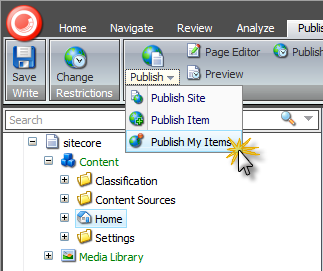
Using the PowerShell Console Module it took me less than 10 minutes total to add a nice piece of functionality that I thought was missing ? Publish items I have modified.
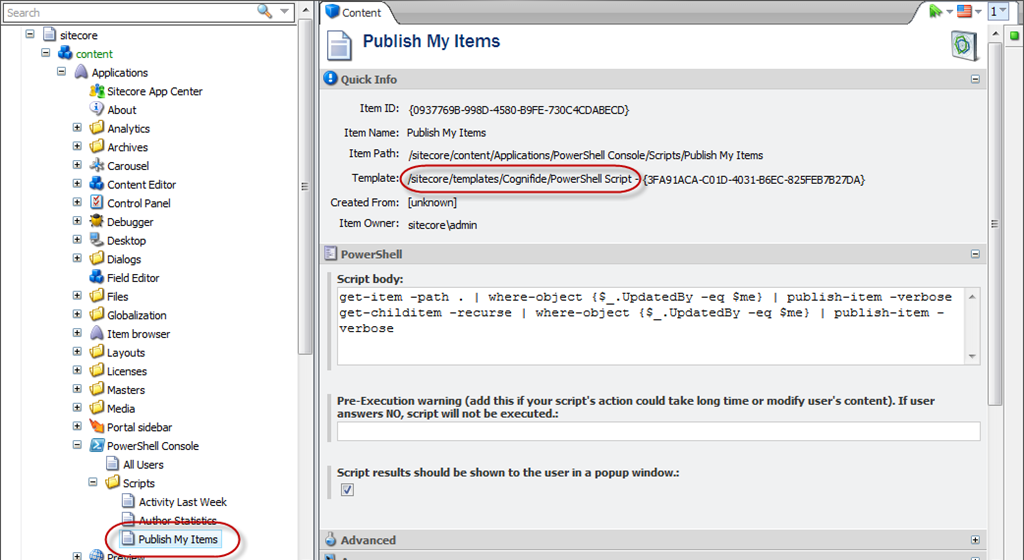
Similarly to extending context menu ? first I?ve created the script I wanted to execute that will take the current item and it?s sub-items and publish them by adding a new script item using the /sitecore/templates/Cognifide/PowerShell Script template in the core database. I?ve put it in the same place I store all my my scripts – in the /sitecore/content/Applications/PowerShell Console/Scripts branch but feel free to store them anywhere in the tree.
Filled in the Script body part with my script.
I decided I want to see the publishing results as I want to verify if the items I expected got published.
Now the UI integration bits?
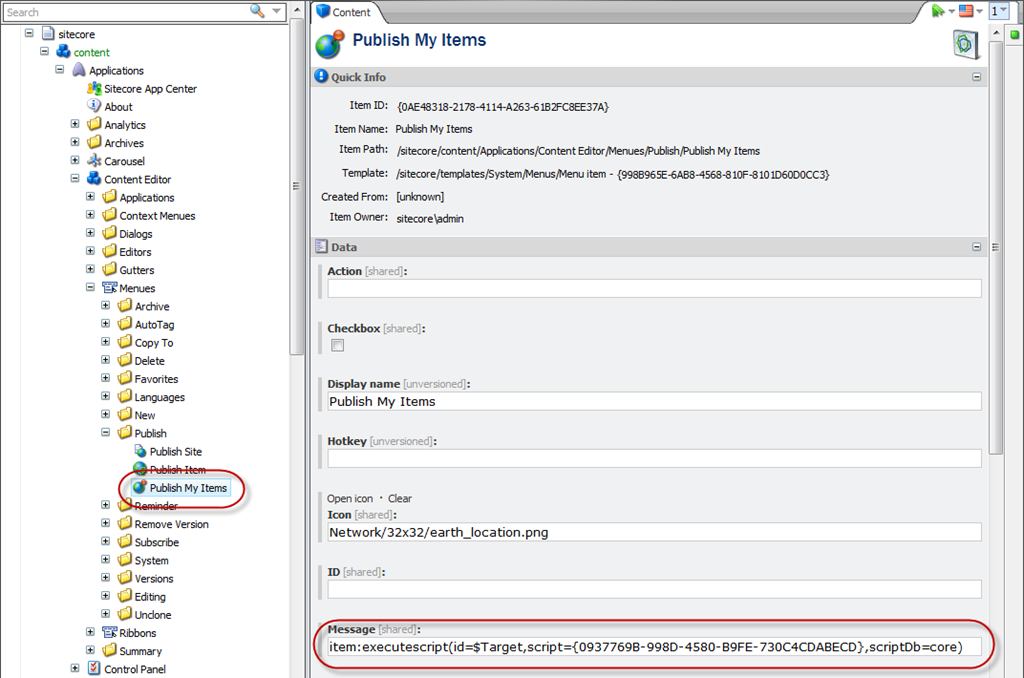
Since I wanted it nicely integrated with the publish button – I?ve created a Publish My Items item of template /sitecore/templates/System/Menus/Menu item within the /sitecore/content/Applications/Content Editor/Menues/Publish/ branch in the core database, set it?s icon and reference the script item in the Message field using the following pattern:
where the script guid is the ID of your script and the scriptDb is the database the script is located in.
That?s it really. You can download the solution but I would strongly recommend you try the manual approach ? it?s really exciting to see the puzzles click in.
August 18th, 2011 by Adam Najmanowicz | 63 Comments
We had a situation in the company this week which required us to deliver the whole EPiServer virtual path provider file structure to the client ? zipped. Easy enough? go to the EpiServer VPP directory and? well? ok? hmm? so the path provider is versioning and as a consequence the physical organization of files on the disk does not make any sense for a human trying to browse it.
Fine! So let?s create a native provider and do a copy and paste within the file manager?. hmm an exception complaining about the provider incompatibility?
Naturally, my knee-jerk reaction is ? let?s do it with the PowerShell? which I recall was doing something like this in it?s previous version? The example I?ve tested and placed in the ?Samples? tab was:
cd VPP:\
cd \Documents\
get-childitem -recurse |
    copy-item -destination \DocumentsNonVersioningVPP\
This worked well but flattened the directory structure ? in other words useless for our client.
I?ve tried what should work in a plain PowerShell:
cd VPP:\
copy-item -path vpp:\Documents\*
          -destination vpp:\DocumentsNonVersioningVPP\
          -recurse -force
Now that didn?t work at all, and turned out to be a bug in my PowerShell plugin?s PSDrive provider. Unfortunately when I attempted to fix it by implementing the copy in the naive way ? using UnifiedDirectory?s Copy method I?ve run into the same exception about incompatibility between the classes that I?ve seen when trying to copy the files form the file manager.
Most of this post is also based on the Microsoft?s Windows PowerShell Quick Reference however despite the sharing scripting runtimes the nature of the both shells differ considerably as described in the previous post: PowerShell for EPiServer – cheat sheet – Part 1. In all cases where it made sense I?ve converted the samples to establish them in EPiServer scenarios.
How to Write Conditional Statements
To write an If statement use code similar to this:
$page = Get-CurrentPage;
$changedBy = $page.ChangedBy;
$me = [EPiServer.Security.PrincipalInfo]::Current;
$myName = $me.Name;

if ($changedBy -eq "")
  { "Unspecified author - a system page?" }
elseif ($changedBy -eq $myName)
  { "The page has been last edited by me!" }
else
  { "The page has been last edited by "+ $changedBy }
Instead of writing a series of If statements you can use a Switch statement, which is equivalent to VBScript?s Select Case statement:
$page = Get-CurrentPage;
switch ($page.PageChildOrderRule) {
    0 {"Undefined sort order. "}
    1 {"Most recently created page will be first in list"}
    2 {"Oldest created page will be first in list"}
    3 {"Sorted alphabetical on name"}
    4 {"Sorted on page index"}
    5 {"Most recently changed page will be first in list"}
    6 {"Sort on ranking, only supported by special controls"}
    7 {"Oldest published page will be first in list"}
    8 {"Most recently published page will be first in list"}
    default {"No idea what that means!"}
  }
Itâs been a while since I had a chance to do any coding… turns out leading a development division tends to not have much to do with development⌠who knew?!
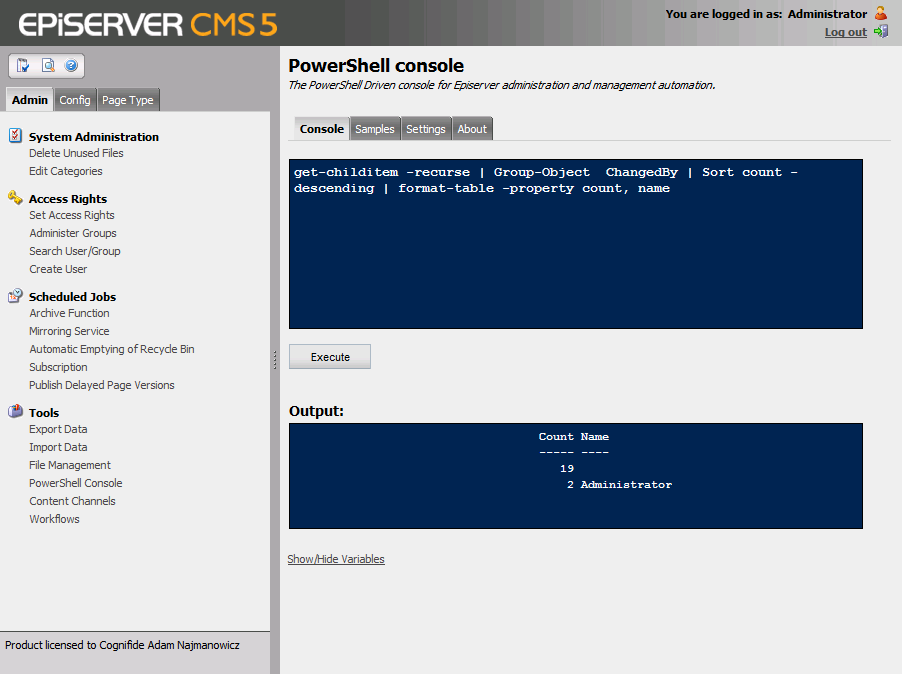
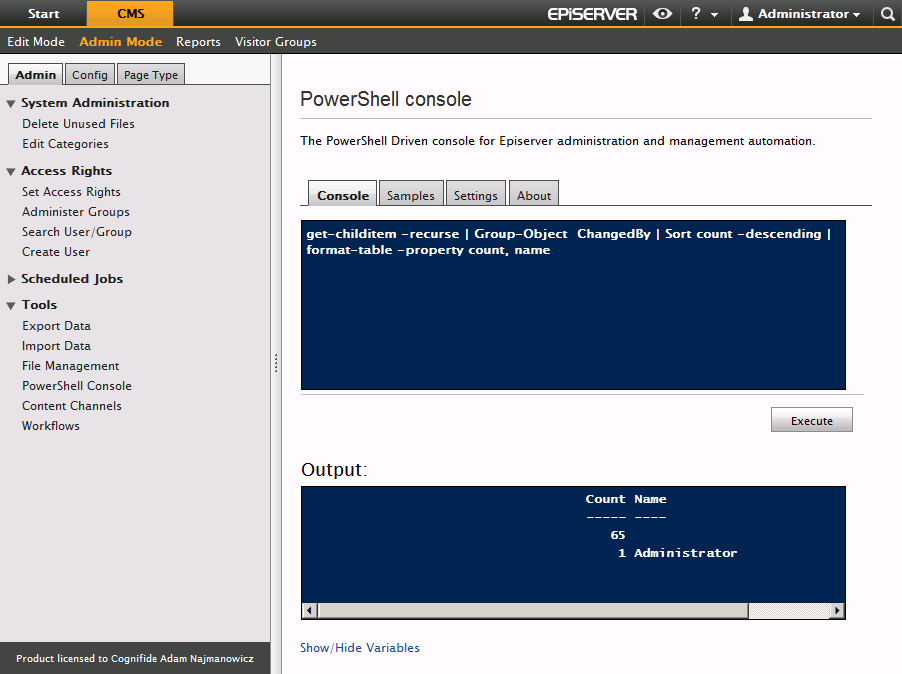
But Iâve finally got a moment to sit down and refresh the EPiServer PowerShell console and make it compatible with both CMS versions 5 & 6. You could technically use it before on CMS 6 but the looks of it was broken. (previous version available here)
What triggered it was a talk with Michael Sadler earlier this week. Michael is a technical consultant by day (and a musician by night) in our solutions team in London. We talked how he was doing a content audit for a client in one of the other CMSâes weâre supporting. Which really sounded like a daunting task⌠The content got exported as XML and then he had to write a bunch of C# code to parse it and create statistics for e.g. how many people edit the content, who created the majority of the content etc⌠well I couldnât resist but to bragâŚ
looks through all the pages, and counts how many articles by each author there are in the CMS. Naturally you can also do it on a sub-branch of content as well.
Iâm sorry Michael you had to go through this without PowerShellâŚ
Deployment
The plugin will detect the version of EPiServer itâs running under and will skin itself appropriately to match the CMS style.
As far as I can tell, your PowerShell scripts will be interchangeable between the versions, as far as they themselves donât touch any API thatâs undergone a breaking change.
 I?ve decided to 1-up the game from my previous post and zip something that isn?t really a real file but rather a blob in a Sitecore database. The script below is based heavily on the last post but instead of just zipping content of a flat folder traverses the Sitecore item tree and zips all files beneath the current folder.

 (3 votes, average: 4.67 out of 5)
 Loading...

 (1 votes, average: 4.00 out of 5)