One of the things I love about Sitecore XM/XP with SXA is that site definitions live in items rather than config files. You add a site, you rename a site, you delete a site, and nobody has to restart the application. The SXA site provider reads from the content tree, rebuilds its internal site dictionary, refreshes MVC routes, clears caches, and the instance is ready. Elegant.
Until you have two thousand sites.
Should I use it in my project?You do not need this optimization unless you have over ~200 sites in your instance. Sitecore handles this level of sites just fine OOTB.
Where It Falls Apart
The default SXA SiteProvider does all its work synchronously. When a site definition item changes, the provider reloads every site in the solution, refreshes every MVC route, and clears every related cache. During that entire process the request that triggered the change is blocked. The user who saved that site definition item sits there staring at a spinner.
For a typical Sitecore deployment with a handful of sites, this is fine. The reload takes a fraction of a second and nobody notices. But the time it takes scales linearly with the number of sites, and when you cross a couple hundred sites it starts to become noticeable. At two thousand sites, the synchronous reload takes long enough that editors start submitting support tickets about Sitecore being slow.
When I profiled the reload, the site definitions themselves loaded quickly. Sitecore’s code for resolving site items and parsing their properties is perfectly efficient. The bottleneck was the HttpRoutesRefresher - the SXA component that rebuilds MVC route tables after sites change. With two thousand sites, each contributing routes, refreshing the route table is not cheap. And this was happening on the request thread.
The Core Idea
The reload does not need to be synchronous. The previous set of site definitions is still perfectly valid while the new set is being prepared. A brief window of eventual consistency - say 20 to 30 seconds - is completely acceptable. Content authors are not adding hundreds of sites per minute. They change a hostname, save, and move on.
The approach: move the reload into a Sitecore background job. When a site definition changes, mark the provider as dirty and kick off a job. The job reloads everything, refreshes routes, clears caches, and swaps the site dictionary atomically. Meanwhile, the previous sites continue serving requests without interruption.
The tricky part is burst updates. If a content author saves three site definitions in quick succession, you do not want three background jobs competing with each other. The solution uses a dirty flag and a single-job guarantee:
- When a change comes in, set the dirty flag
- If no job is running, start one
- The job clears the dirty flag and begins reloading
- If another change arrives while the job is running, the dirty flag gets set again
- When the job finishes, it checks - if dirty again, another reload will happen on the next request
There is ever only going to be at most one reload job running at any given time. No thread pool stampede, no race conditions, no missed updates.
The AsyncSxaSiteProvider
A significant portion of this code is a reimplementation of what Sitecore’s own SXA site provider already does - parsing site definition items, building the properties dictionary, resolving start items and login pages. It would be fantastic if the asynchronous approach made it back into the platform itself, since every solution at scale would benefit.
The provider class signature is straightforward:
 1public class AsyncSxaSiteProvider : SiteProvider, ISxaSiteProvider, ISxaDatabaseSiteProvider,
 2    IAsyncSxaSiteProvider
 3{
 4    private bool _init = false;
 5    private bool _dirty = false;
 6    private readonly bool _initialLoadAsync;
 7    private readonly object _lock = new object();
 8    private string _database;
 9    private SiteCollection _sites;
10    private SafeDictionary<string, Site> _siteDictionary;
11    private readonly ILoggingHelper _logHelper;
12    private readonly IPipelinesHelper _pipelinesHelper;
13    private readonly IEnvironmentSitesResolver _sitesResolver;
14
15    public Handle JobHandle { get; set; }
The _dirty flag and _init flag work together. _dirty signals that the data is stale and needs refreshing. _init prevents concurrent entry into InitializeSites() during the first synchronous load (before the background mechanism kicks in).
The decision point is TryBackgroundInitialize(), called from both GetSite() and GetSites():
 1private void TryBackgroundInitialize()
 2{
 3    if (_siteDictionary == null)
 4    {
 5        if (_initialLoadAsync)
 6        {
 7            _siteDictionary = new SafeDictionary<string, Site>();
 8            _dirty = true;
 9            StartBackgroundJob(null);
10        }
11        else
12        {
13            InitializeSites();
14        }
15    }
16    else if (_dirty)
17    {
18        StartBackgroundJob(null);
19    }
20}
On first call with no data, the provider either loads synchronously (safe default) or kicks off a background job if the PerformantSitecore.SxaSiteProvider.InitialLoadAsync setting is true. The async initial load can shave seconds off Sitecore startup time, but it means sites are not available until the first background load completes - so it is off by default.
The Background Job
The StartBackgroundJob method uses Sitecore’s built-in JobManager:
 1public void StartBackgroundJob(Item item)
 2{
 3    if (!IsReloading)
 4    {
 5        _logHelper.LogInfo($"AsyncSxaSiteProvider.StartBackgroundJob[{item?.Uri}]", this);
 6        DefaultJobOptions jobOptions =
 7            new DefaultJobOptions("Site Provider Reloader",
 8                "SxaSiteProvider",
 9                "<all>",
10                this,
11                "InitializeSites");
12        jobOptions.AtomicExecution = false;
13        jobOptions.EnableSecurity = false;
14        JobHandle = JobManager.Start(jobOptions).Handle;
15    }
16}
The IsReloading check is the single-job guarantee. If a job is already running, we skip starting another one. The dirty flag will catch it on the next cycle.
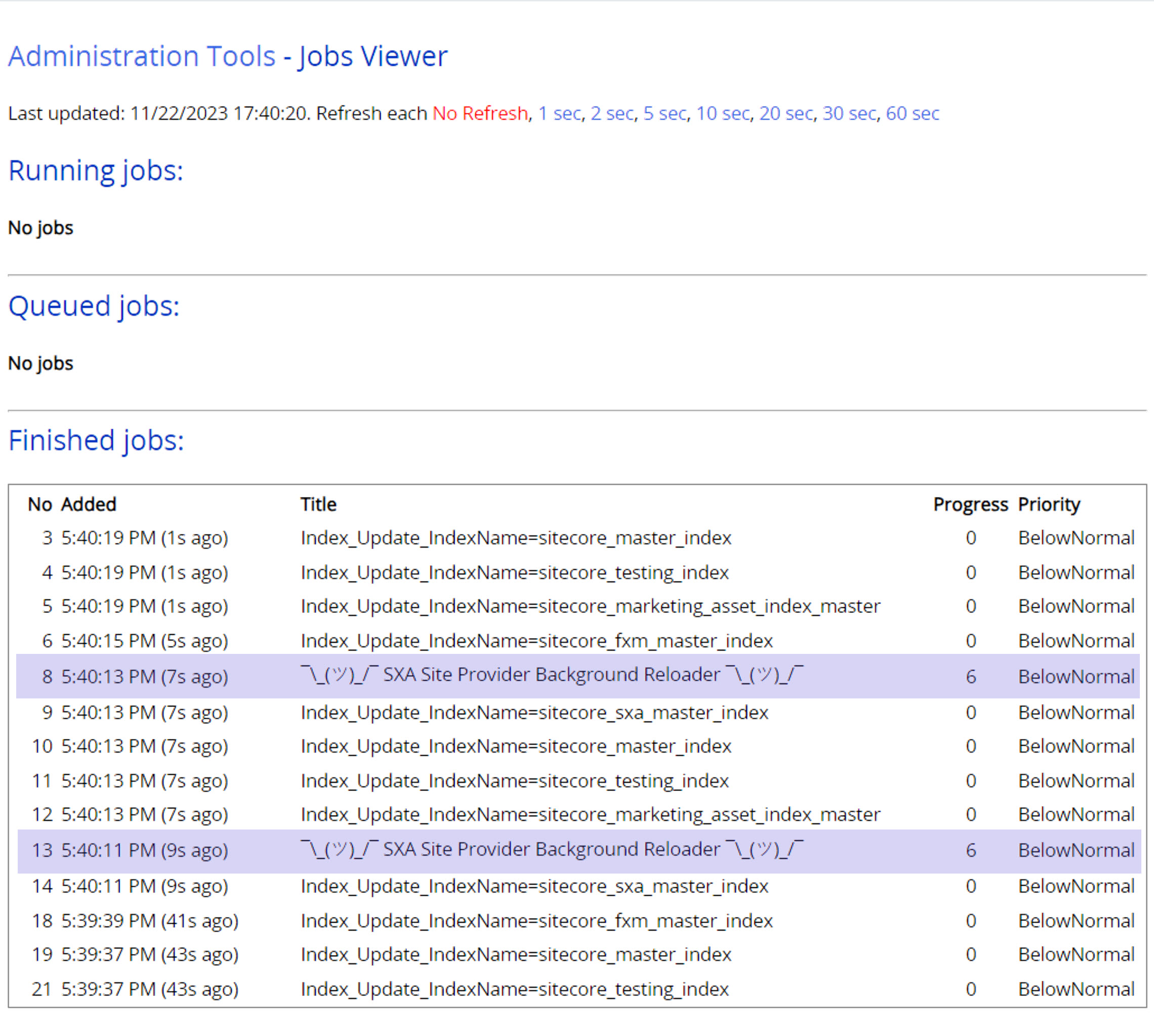
You can see these jobs in the Sitecore Admin Jobs Viewer (/sitecore/admin/jobs.aspx). They show up as “Site Provider Reloader” entries:
The siteProviderInitialized Pipeline
After sites are reloaded, there is cleanup work to do: caches need clearing, route tables need refreshing, various SXA internal caches need invalidating. Rather than stuffing all that logic into the provider itself, the post-reload work runs as a Sitecore pipeline with six processors:
1<siteProviderInitialized>
2    <processor type="...SiteContextFactoryReset, ..." resolve="true" />
3    <processor type="...SiteInfoResolverReset, ..." resolve="true" />
4    <processor type="...HttpRoutesRefresher, ..." resolve="true" />
5    <processor type="...AllSxaSiteCacheClearer, ..." resolve="true" />
6    <processor type="...MultisiteContextCacheClearer, ..." resolve="true" />
7    <processor type="...SiteInfoResolverCacheClearer, ..." resolve="true" />
8</siteProviderInitialized>
Each processor handles one specific concern:
- SiteContextFactoryReset - resets Sitecore’s
SiteContextFactoryso it picks up the new site definitions - SiteInfoResolverReset - resets the SXA
ISiteInfoResolvercache - HttpRoutesRefresher - the expensive one, rebuilds MVC route tables by calling SXA’s own
HttpRoutesRefresherinternally - AllSxaSiteCacheClearer - iterates all SXA sites and clears their HTML caches
- MultisiteContextCacheClearer - clears the SXA multisite context cache for the relevant database
- SiteInfoResolverCacheClearer - clears the site info resolver cache, with a guard to prevent duplicate clearing in the same pipeline run
The key detail: these processors check JobContext.IsJob before doing their work. This means they only execute inside the background job. If InitializeSites() is called synchronously (during the very first load), the pipeline still runs but the expensive processors skip their work, since the default SXA event handlers handle it on that path.
The HttpRoutesRefresher also skips execution if a publish is in progress (JobsHelper.IsPublishing()), avoiding conflicts with the publishing pipeline.
Configuration
The config patch replaces the default SXA site provider and removes the synchronous SXA HttpRoutesRefresher event handler (since we handle route refreshing inside the pipeline instead):
 1<siteManager defaultProvider="sitecore">
 2    <providers>
 3        <add patch:instead="*[@name='sxa']"
 4             name="async-sxa"
 5             type="...AsyncSxaSiteProvider, ..."
 6             database="master"
 7             checkSecurity="false"
 8             resolve="true" />
 9    </providers>
10</siteManager>
11
12<events>
13    <event name="item:saved">
14        <handler type="...HttpRoutesRefresher, Sitecore.XA.Foundation.Multisite"
15                 method="OnItemSaved">
16            <patch:delete />
17        </handler>
18    </event>
19</events>
For Content Delivery instances, override the database attribute to "web" in a role-specific config patch.
Results
After deploying the async provider to a solution with roughly two thousand SXA sites:
- Editor experience improved dramatically - saving a site definition is now instant from the editor’s perspective, the reload happens silently in the background
- No more request blocking - the synchronous bottleneck that caused timeout-like behavior during route refresh is gone
- Eventual consistency window - sites typically update within 15 to 25 seconds of a save, well within acceptable limits for editorial workflows
- No missed updates - the dirty flag mechanism ensures that even rapid successive changes are captured and processed
Things to Keep in Mind
The background reload means there is a brief window where the old site configuration is served. For most editorial workflows this is irrelevant, but if you need strict consistency on site definition changes, you probably should stick to the OOTB synchronous provider.
A large portion of this code is essentially a copy of what SXA’s own
SiteProviderdoes for parsing site items. That is unavoidable since the original class was not designed for extension. If Sitecore ever refactors the SXA site provider to support background loading, this module can be retired.The
HttpRoutesRefresheris the main cost center. If you are looking for further optimization, consider whether your solution truly needs full route refresh on every site change, or whether a more targeted route update is possible.The
PerformantSitecore.SxaSiteProvider.InitialLoadAsyncsetting can speed up Sitecore startup by deferring the initial site load. Test this carefully in your environment - some components may not handle the brief period where no SXA sites are available. I, for once, am not turning it on locally as the startup delay does not compensate for the uncertainty of when my instance is ready for me.
Getting the Code
The full implementation is available in the PerformantSitecore repository on GitHub. The Foundation.SxaSiteProvider project contains the async provider, all six pipeline processors, the helper abstractions, and the config patch. Drop the DLL and config file into your Sitecore 10.x solution and you are running.
This functionality is for Sitecore XM/XP 10.x on .NET Framework 4.8 with SXA installed.
Comments