While profiling a Sitecore XM/XP 10.x solution I noticed something that made me do a double take. Hundreds of SQL calls per single page request. Not complex queries either - simple, repetitive child item lookups hitting the database over and over again.
This turned out to be a missed caching opportunity in Sitecore’s SqlServerDataProvider. Specifically, the GetChildIdsByName method gets called every time Sitecore needs to resolve a child item by name under a given parent. On a content-heavy site with deep trees and lots of renderings, that adds up fast.
The fix? A thin caching overlay that took about 100 lines of code to write, and the results were frankly hard to believe at first.
The Problem
If you attach a SQL profiler to a Sitecore XM/XP instance and watch what happens during a typical page request, you will see a pattern like this:
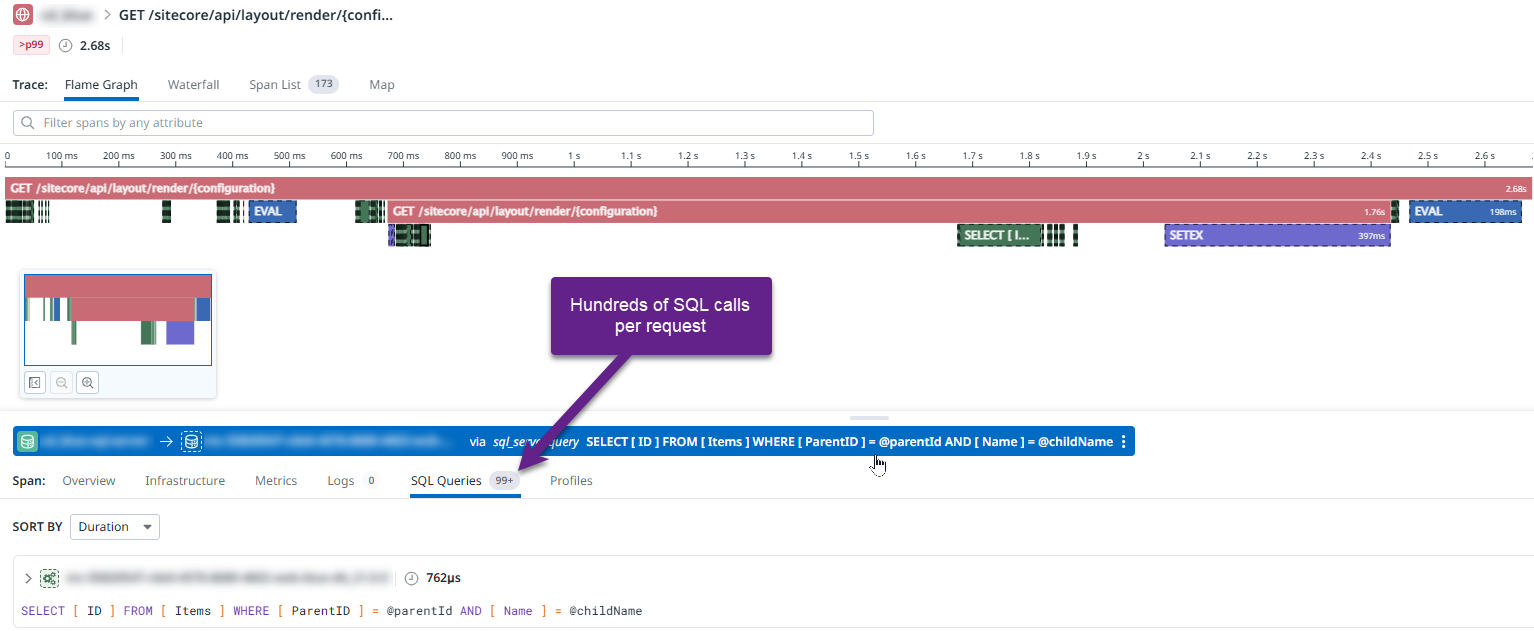
Hundreds of nearly identical GetChildIdsByName calls per request. Each one is fast individually, but the sheer volume creates unnecessary SQL Server load, eats up DTUs on Azure Elastic Pools, and adds latency to every single page render.
The underlying issue is straightforward. Sitecore resolves items by path segments, and each segment requires a database lookup to find child items by name under a specific parent. These relationships rarely change during a session, but Sitecore does not cache them at the data provider level.
The Solution
The approach is intentionally simple. Extend SqlServerDataProvider, override GetChildIdsByName, and cache the results using Sitecore’s native CustomCache infrastructure so it shows up on /sitecore/admin/cache.aspx and participates in standard cache clearing.
Here is the core provider:
 1public class CachingSqlDataProvider : Sitecore.Data.SqlServer.SqlServerDataProvider
 2{
 3    private static DatabaseCacheMap _cacheMap;
 4    private ParentChildRelationCache _cache;
 5
 6    public static bool CacheEnabled { get; set; } = true;
 7
 8    public CachingSqlDataProvider(string connectionString) : base(connectionString)
 9    {
10    }
11
12    public static DatabaseCacheMap CacheMap
13    {
14        get
15        {
16            if (_cacheMap == null)
17            {
18                string cacheName = Settings.GetSetting(
19                    "PerformantSitecore.SqlDataProvider.CacheName",
20                    "PerformantSitecore.ChildParentRelation");
21
22                long cacheMaxSize = StringUtil.ParseSizeString(
23                    Settings.GetSetting(
24                        "PerformantSitecore.SqlDataProvider.CacheMaxSize", "10MB"));
25
26                _cacheMap = new DatabaseCacheMap(cacheName, cacheMaxSize);
27
28                CacheEnabled = Settings.GetBoolSetting(
29                    "PerformantSitecore.SqlDataProvider.CacheEnabled", true);
30            }
31
32            return _cacheMap;
33        }
34    }
35
36    protected override IdList GetChildIdsByName(string childName, ID parentId)
37    {
38        if (!CacheEnabled || !IsCaching)
39        {
40            return base.GetChildIdsByName(childName, parentId);
41        }
42
43        var result = new IdList();
44        var item = Database.GetItem(parentId);
45        if (item == null)
46        {
47            return result;
48        }
49
50        var children = Cache.GetRelations(item.ID);
51        result = children.GetOrAdd(childName,
52            _ => base.GetChildIdsByName(childName, parentId));
53        return result;
54    }
55
56    public static void ClearCache(string databaseName)
57    {
58        if (CacheEnabled)
59        {
60            var cache = CacheMap.GetCacheForDatabase(databaseName);
61            if (cache.Enabled)
62            {
63                cache.Clear();
64            }
65        }
66    }
67}
The cache value itself is a ConcurrentDictionary<string, IdList> that implements ICacheable so Sitecore can track its memory footprint:
 1public class ChildNamesCacheValue
 2    : ConcurrentDictionary<string, IdList>, ICacheable
 3{
 4    public long GetDataLength()
 5    {
 6        var size = TypeUtil.SizeOfDictionary();
 7        foreach (var kvp in this)
 8        {
 9            size += TypeUtil.SizeOfString(kvp.Key) +
10                    TypeUtil.SizeOfList(kvp.Value) +
11                    TypeUtil.SizeOfID() * kvp.Value.Count;
12        }
13        return size;
14    }
15
16    public bool Cacheable { get; set; } = true;
17    public bool Immutable => false;
18    public event DataLengthChangedDelegate DataLengthChanged;
19}
A DatabaseCacheMap manages one ParentChildRelationCache per Sitecore database (master, web, core), and the ParentChildRelationCache itself extends Sitecore.Caching.CustomCache so it shows up in the Sitecore cache admin pages.
Cache Invalidation
The cache gets cleared via Sitecore event handlers whenever items are saved, deleted, or copied. This works both for local events and remote events in multi-instance deployments:
 1<events>
 2    <event name="item:saved">
 3        <handler patch:before="*"
 4                 type="...SqlDataProviderCacheClearer, ..."
 5                 method="OnItemSaved" />
 6    </event>
 7    <event name="item:saved:remote">
 8        <handler patch:before="*"
 9                 type="...SqlDataProviderCacheClearer, ..."
10                 method="OnItemSavedRemote" />
11    </event>
12    <!-- Same pattern for item:deleted and item:copied -->
13</events>
The event handler is straightforward - extract the database name from the event args and call CachingSqlDataProvider.ClearCache(databaseName).
Wiring It In
The entire thing plugs in via a single Sitecore config patch. No code changes to the existing solution required:
1<dataProviders>
2    <main type="Sitecore.Data.$(database).$(database)DataProvider, Sitecore.Kernel">
3        <patch:attribute name="type"
4            value="PerformantSitecore.Foundation.SqlDataProvider.Providers.CachingSqlDataProvider,
5                   PerformantSitecore.Foundation.SqlDataProvider"/>
6    </main>
7</dataProviders>
Settings are fully configurable:
1<settings>
2    <setting name="PerformantSitecore.SqlDataProvider.CacheEnabled" value="true" />
3    <setting name="PerformantSitecore.SqlDataProvider.CacheMaxSize" value="10MB" />
4
5    <!-- Per-database toggles -->
6    <setting name="PerformantSitecore.SqlDataProvider.master.CacheEnabled" value="true" />
7    <setting name="PerformantSitecore.SqlDataProvider.web.CacheEnabled" value="true" />
8    <setting name="PerformantSitecore.SqlDataProvider.core.CacheEnabled" value="true" />
9</settings>
You can enable or disable caching per database, which is useful during development when you want the master database lookups to always hit SQL for freshness, but want the web database (which powers your CD instances) to cache aggressively.
The Results
After deploying this to production, here is what the same request trace looks like:
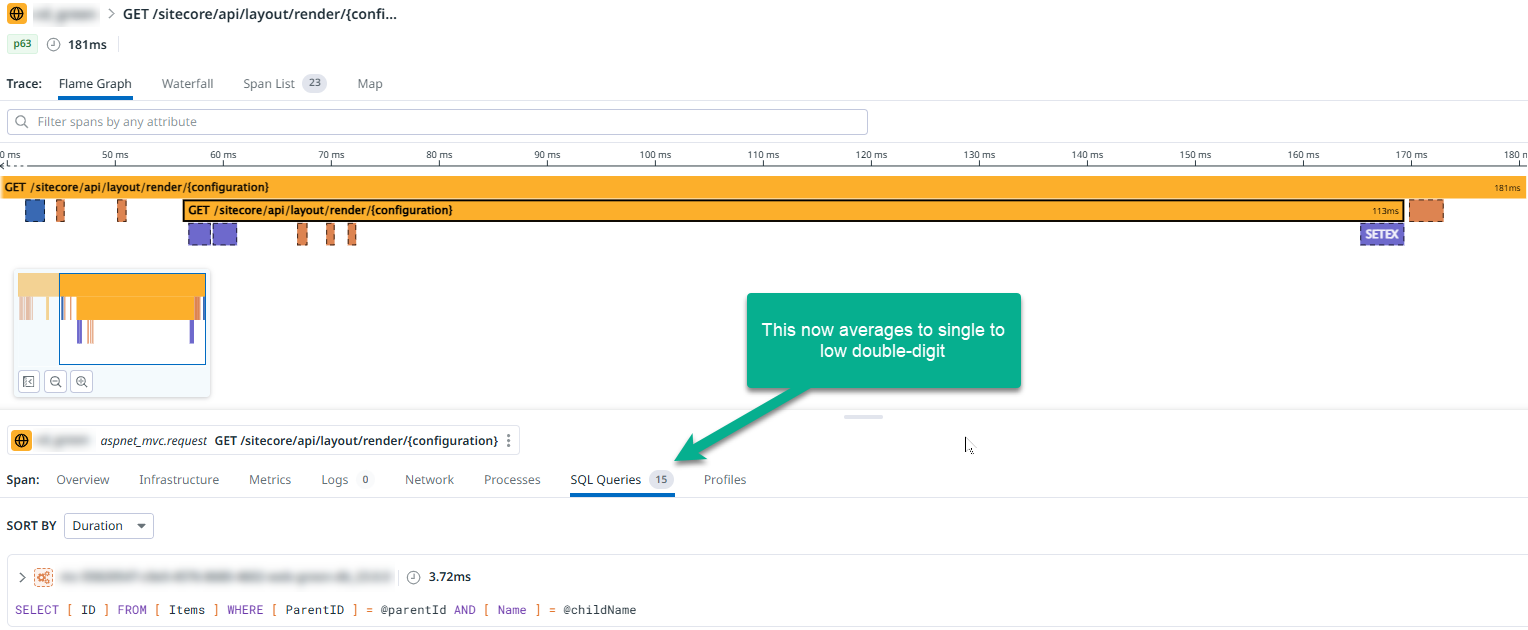
The improvement is dramatic. The SQL call volume dropped from hundreds per request to low double-digits.
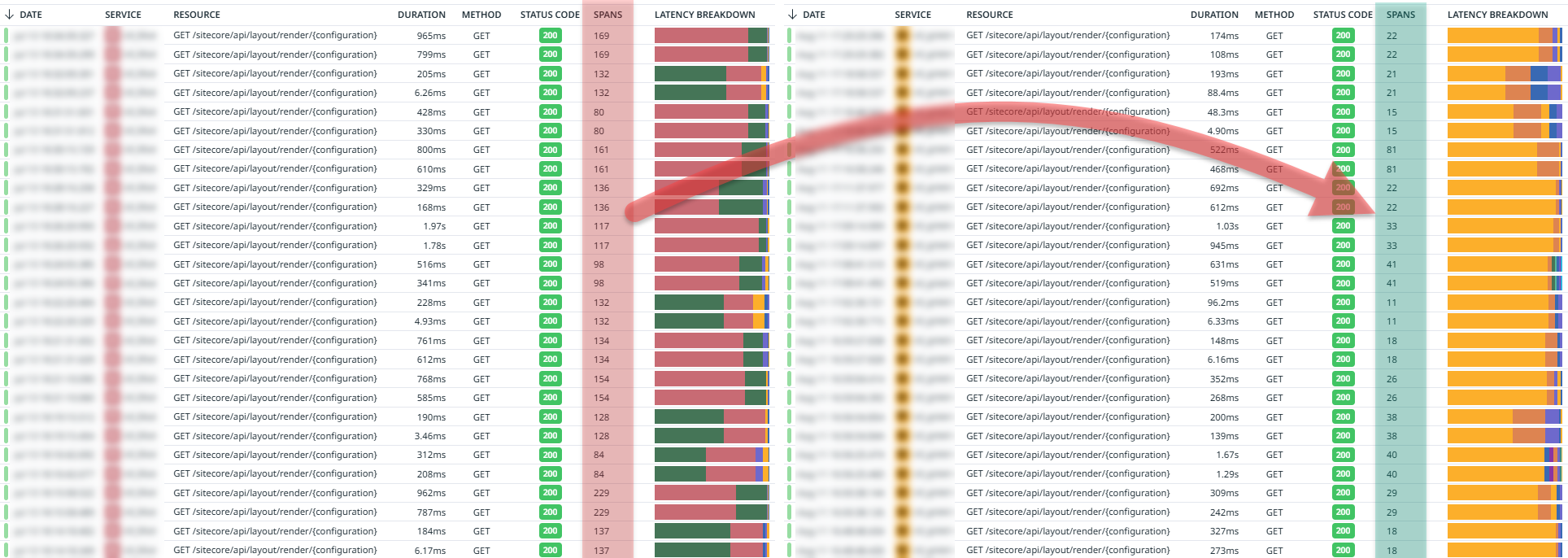
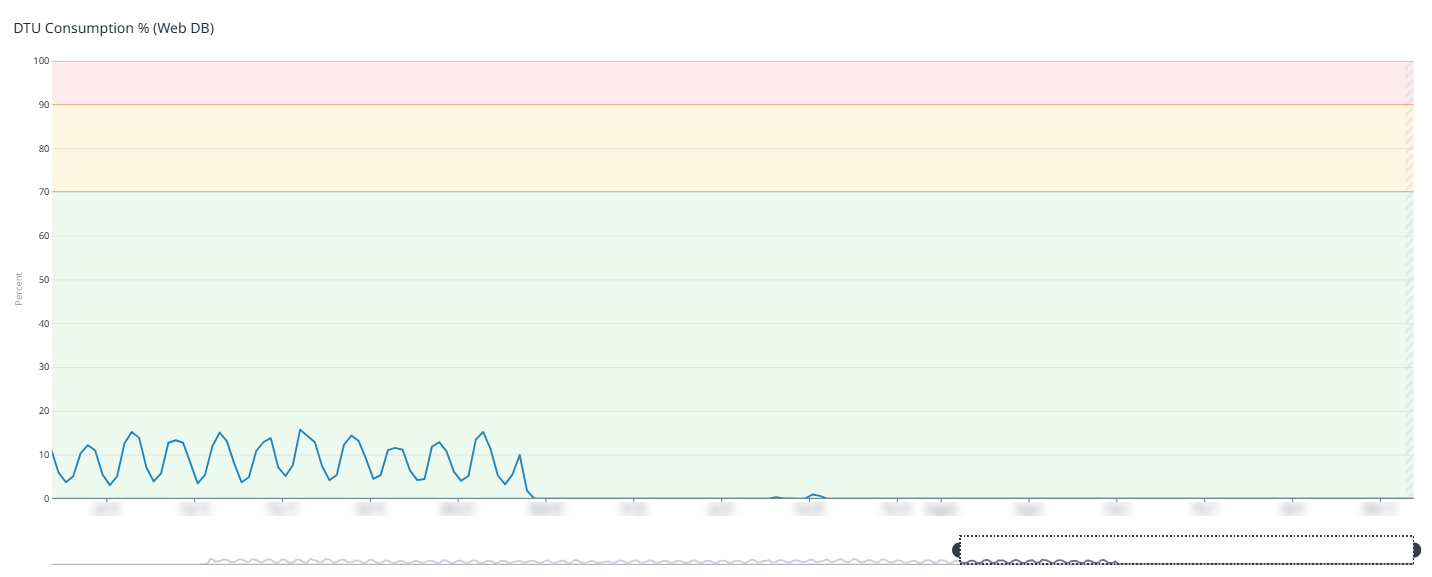
Looking at the compounded effect over a period of weeks, you can see the exact moment the optimization went live:
DTU Consumption
For Azure-hosted Sitecore instances, SQL DTU consumption is directly tied to hosting costs. The web database DTU consumption dropped from a consistent 8-15% down to effectively 0%:
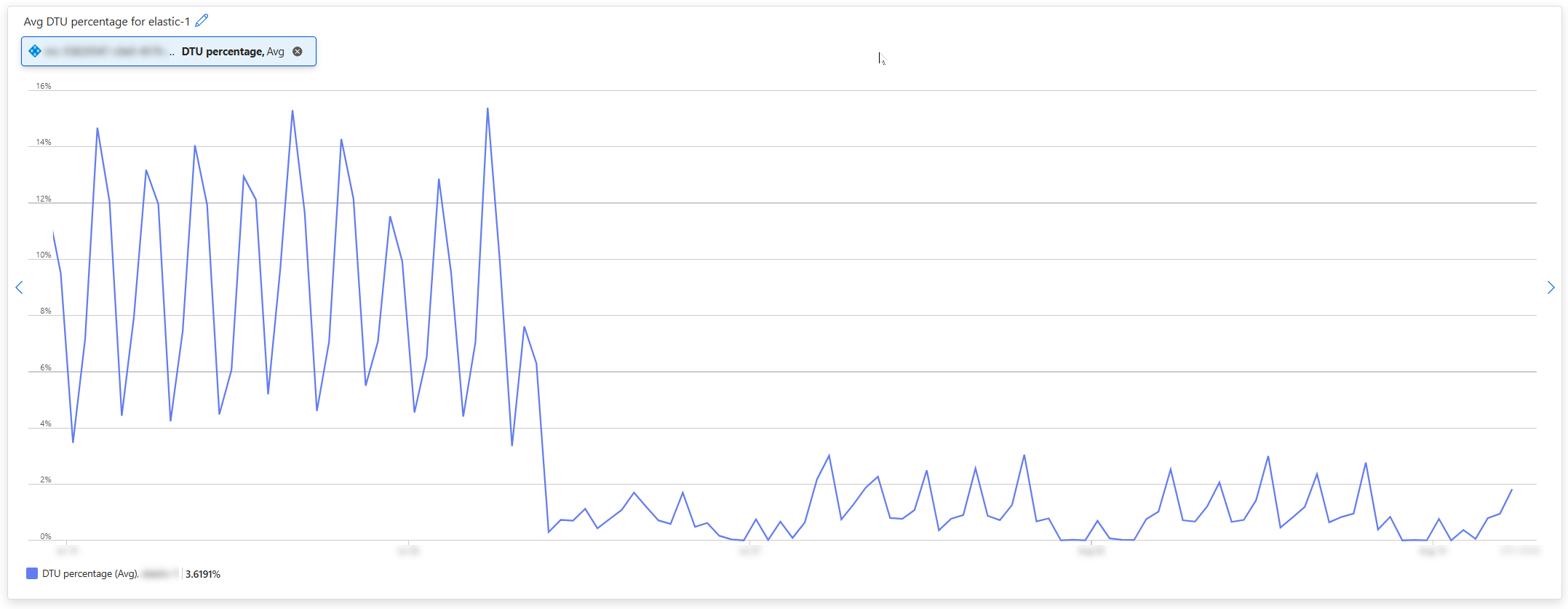
The DTU consumption chart for the web database:
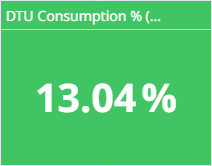
The average DTU numbers tell the story even more clearly.
Before:
After:
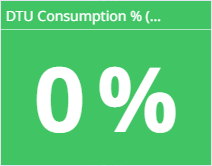
Yes, that says 0%. I had the same reaction. The SQL calls that were consuming DTUs were almost entirely the repetitive GetChildIdsByName lookups. Caching them effectively eliminated the web database SQL load.
The Broader Impact
This was part of a larger optimization effort, but the SQL data provider change contributed the most significant measurable improvement:
- SQL round-trips reduced by a factor of 7-10x
- Web database DTU consumption dropped from ~13% to ~0%
- Average page render times dropped by 50-66%
- Azure instance count went from frequently needing 4-5 instances down to never exceeding 3, and later to 2
That last point is worth emphasizing. The reduced SQL load meant lower overall server utilization, which meant fewer auto-scaled instances were needed. On Azure, fewer instances directly means lower costs.
Try It Yourself
I have extracted this into a standalone project that depends only on Sitecore.Kernel (no SXA dependency required). You can find it on GitHub:
The project follows Helix conventions and compiles against .NET Framework 4.8 / Sitecore 10.2+. Drop the DLL and config file into your Sitecore instance and you are done.
Things to Keep in Mind
Cache size: The default 10MB should be sufficient for most sites. Monitor it via
/sitecore/admin/cache.aspxand adjust theCacheMaxSizesetting if needed.Content authoring: The cache clears on every item save/delete/copy event. On a busy CM instance with many authors, you might see less benefit because the cache gets invalidated frequently. The real wins are on CD instances where content only changes on publish.
Multi-instance deployments: The event handlers handle both local and remote events, so the cache stays consistent across CD instances in a scaled environment.
Sitecore versions: This has been tested on Sitecore XM/XP 10.2+. It should work on earlier 10.x versions as well since the
SqlServerDataProviderAPI has been stable for a long time. This is specifically for Sitecore XM/XP (the traditional .NET Framework platform), not XM Cloud or any of the composable DXP products.
If you have a Sitecore XM/XP solution running on Azure and you are paying for DTUs you do not need to be paying for, give this a try. The ROI on this particular optimization is hard to beat.
Comments